html & css 기본
사전작업
- vs code 설치
- prettier extention 설치 > editor.fomatOnSave = true
HTML Basics
<!DOCTYPE html>
<html lang="en">
  <head>
    <meta charset="UTF-8" />
    <meta name="description" content="welcome to my website" />
    <title>Document</title>
  </head>
  <body>
    <sction>
      <header id="headerNumberOne" class="defaultHeader">
        <h1>Title of a section</h1>
      </header>
    </sction>
    <div>
      <header id="differHeader" class="dafaultHeader">
        Title of unknown container
      </header>
    </div>
  </body>
</html>- header : 보이지 않는 부분
- body : 보이는 부분
- meta : header에 속함. 브라우저에 전달하는 추가정보
- semantic, non-semantic
- semantic : 제목, 문단, 내비게이션 등등 뭔가 뜻이 있는 태그, 수많은 코드 속에서 헤메이고 있을 때, semantic 태그는 각 항목이 각각 무엇을 뜻하는지 알려준다. 예) section, header
- non-semantic : 아무 지칭한 바 없는, 의미없는 태그들 예) div, span
- id, class
- id : 여권번호같은 고유번호, 고유한 것들에 부여, 각 엘리먼트당 하나.
- class : 수천만명이 가지고 있는 국적, 계속 반복되는 element들에 사용.
CSS Basics
- selector
- property : 소문자, 공백없음, 마지막에 세미클론
- property-name: value;
<head>
  <link rel="stylesheet" href="style.css" />
</head>
// style.css
body {
background-color: aqua;
}
h1 {
color: azure;
}-
css와 html을 연결하는 방법은 inline과 external 방식이 있는데 inline방식은 재활용하려면 html마다 중복되는 css를 사용하므로 추천하지 않는다.
-
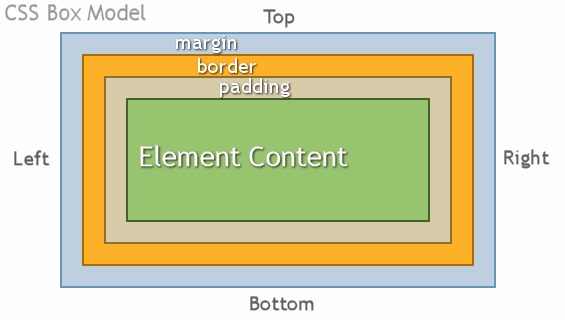
Box Model
- content
- border : padding, margin 가운데
- padding : 안쪽 간격
- margin : 바깥쪽 간격
.box {
  background-color: yellow;
  width: 50%;
  height: 50%;
  padding-top: 50px;
  padding-left: 50px;
  margin-top: 50px;
  margin-left: 50px;
  margin: 20px; // all
  margin: 20px 10px; // top/bottom, left/right
  margin: 20px 10px 5px 2px; // top, right, bottom, left
}
.inside-box {
  background-color: blue;
  width: 50%;
  height: 50%;

  // border
  border-width: 5px;
  border-color: red;
  border-style: dashed;
}
Display
- 참고 : vs code에서 class=“box”인 div생성하기
- div.box*3
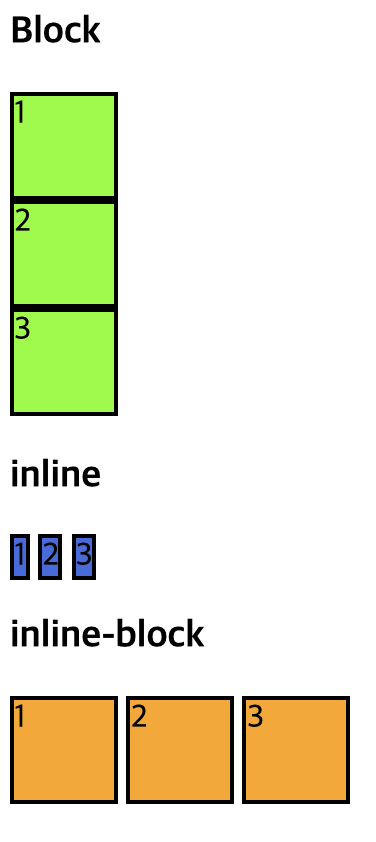
- Inline vs Block vs Inline Block
- inline
- 모든 property 설정값을 지운다.
- text
- box는 사라지고 컨텐츠의 크기만큼만 박스가 생성된다.
- block
- 요소 옆에 아무것도 없는 것. block 다음은 바로 밑에 위치해야 한다.
- 다시 말해서, element 크기와 상관없이 그 옆에 다른 element가 위치하는 것을 허용하지 않는 것.
- 박스의 폭, 높이는 존재하지만 옆에 아무것도 놓을 수 없다.
- inline-block
- 요소 옆에 위치시킴
- 박스의 폭, 높이가 존재하고 옆에 요소를 놓을 수 있다.
- 인라인과 같은 설정값을 원하면서 동시에 박스 형태를 유지하고 싶으면 사용한다.
- inline
<!DOCTYPE html>
<html lang="en">
  <head>
    <meta charset="UTF-8" />
    <title>Display Example</title>
    <style>
      .box1 {
        background-color: chartreuse;
        width: 50px;
        height: 50px;
        border-style: solid;
        border-color: black;
        border-width: 2px;
      }
      .box2 {
        background-color: royalblue;
        width: 50px;
        height: 50px;
        border-style: solid;
        border-color: black;
        border-width: 2px;
        display: inline;
      }
      .box3 {
        background-color: orange;
        width: 50px;
        height: 50px;
        border-style: solid;
        border-color: black;
        border-width: 2px;
        display: inline-block;
      }
    </style>
  </head>
  <body>
    <h1>Block</h1>
    <div class="box1">1</div>
    <div class="box1">2</div>
    <div class="box1">3</div>
    <h1>inline</h2>
    <span class="box2">1</span>
    <span class="box2">2</span>
    <span class="box2">3</span>
    <h1>inline-block</h1>
    <span class="box3">1</span>
    <span class="box3">2</span>
    <span class="box3">3</span>
  </body>
</html>
Position
- static
- 디폴트로 모든 박스는 position이 static이다. 그 element를 거기 놓으면 거기 있을 것이다~ 라는 뜻이다.
- fixed
- fixed는 스크롤해도 고정되어서 사라지지 않는다. position을 fixed로 고정하고 4가지 설정값을 줄 수 있다. top, bottom, left, right
- absolute
- fixed랑 비슷하다. 어디에든 붙일 수 있지만 스크롤한다고 보이지는 않는다.
- position absolute가 설정되면 html상에서 해당 element와 관계가 있는 (relative-부모박스) element를 살펴보고 이에 상응해서 포지션이 결정된다. 부모의 postion 속성이 없으면 유저가 설장한 값대로 움직인다.
- 부모 element가 없으면 body에 맞춰서 position을 잡는다. 반대로 부모가 relative postion을 설정하면 그에 상대해서 absolute position을 잡는다.
- 정리
- position에는 fixed, relative, absolute, static 4가지가 있다 static은 디폴트, fixed는 고정 어디든 오버랩해서 계속 해당 위치에 고정시키기 위한 것, absolute는 position relative에 상대적으로 포지션을 잡는 것 relative가 없을 경우, absolute는 문서의 본문 body에 맞춰서 position을 잡는다.
<!DOCTYPE html>
<html lang="en">
  <head>
    <meta charset="UTF-8" />
    <title>Document</title>
    <style>
      body,
      html {
        /* 브라우저가 갖고 있는 디폴트 값을 상쇄시킴 */
        height: 100%;
        margin: 0;
        padding: 0;
      }
      body {
        height: 400%;
        background-color: red;
      }
      #static {
        height: 300px;
        width: 300px;
        background-color: yellow;
        position: static;
      }
      #fixed {
        height: 300px;
        width: 300px;
        background-color: green;
        position: fixed;
        bottom: 10px;
      }
      #abs-box {
        height: 400px;
        width: 400px;
        background-color: hotpink;
        position: relative;
      }
      #abs-child {
        width: 100px;
        height: 100px;
        background-color: black;
        position: absolute;
        right: 0;
        top: 10px;
      }
    </style>
  </head>
  <body>
    <div id="static">
      <div class="box-chid"></div>
    </div>
    <div id="fixed">
      <div class="box-chid"></div>
    </div>
    <div id="abs-box">
      <div id="abs-child"></div>
    </div>
  </body>
</html>